
System we operate
Daena
Agents that plan and act inside approval gates, with every decision on the record.
Beta, with access on request at daena.mas-ai.co. It is the reference architecture we draw on for governed agent builds.
Read the case study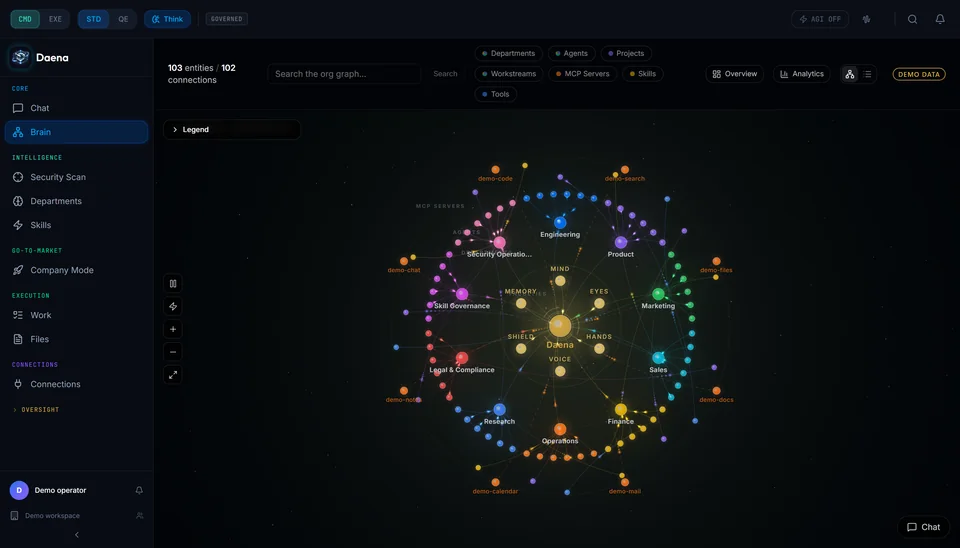
We take the work your team repeats every day and build the automation that does it. It connects to your tools, it is tested on your real cases, and a person approves anything that matters.
“New enquiries sit in the inbox until someone has time.”
We build an intake flow that reads the enquiry, asks for what is missing, drafts the reply and books the call. You approve what goes out until you trust it.
“We copy the same information between four systems.”
A workflow moves it once, checks that both sides match, and sends exceptions to a named person.
“Our best people spend the week on admin.”
Agents take the first pass on triage, drafting and lookups. People keep the judgement calls and see what the agent did.
“We tried an AI tool and cannot tell what it did.”
Every run is logged: the input, the steps, the tools it called, the output and who approved it. A decision can be replayed.
“Only one person knows how this process works.”
We map it, write it down and build it so the process survives that person going on holiday.
Six kinds of system. Most projects are one or two of them, joined to what you already run.
Scheduled and event-driven jobs that move data, produce documents and start the next step. Failures retry, then alert a person.
Agents that read, decide and act inside limits you set. Actions that spend money, send messages or change records wait for a person.
Several specialised agents that hand work to each other, for jobs too large for one prompt. We build this only when a simpler design would not do.
Assistants that answer from your own documents and show the source. The depth is on the knowledge systems page.
The layer that lets an AI assistant use your tools safely: read a record, create a ticket, update a sheet, each with its own permission.
Phone and voice assistants for booking and simple triage, when callers would rather talk than type. It is not the right answer for every business, and we say so.
Usually, yes. Most automation work is the join between systems you already run, so we build against what you have instead of asking you to switch.
We connect through a tool's official API. Where a tool has no usable API, we say so at the start and propose the least fragile alternative. Our own platform catalogs 116 connectors. For a client build we implement only the ones your workflow needs.
Automation runs wherever its data and its model can run. The mode changes what you get, and what you give up.
Fits, with limits
Single-user assistants and drafting on a laptop or workstation, with small open-weight models. Shared or heavy workflows need a server.
Fits
Behind your firewall with open-weight models sized to your hardware. On some tasks quality is below the largest cloud models, so we test on your cases first.
Fits
In your own cloud account with your keys and network rules. Models run there, or are called under your own provider agreement.
Fits
Sensitive steps run locally and heavy steps use a cloud model. The routing rule is written down and every routed call is logged.
Fits
The quickest to start. Data goes to the model provider under its terms, so it suits work that is not sensitive.
Not every model or feature is available in every mode. We say which before you commit.
For technical readers: what we choose from. The choice is made per system, from your data, your constraints and your workload.
We name clients only with their written permission. What we can show is what we build, operate and use every day. It is the same set of patterns we build for you.
Agents that plan and act inside approval gates, with every decision on the record.
Beta, with access on request at daena.mas-ai.co. It is the reference architecture we draw on for governed agent builds.
Read the case studyThe connector layer: many tools behind one endpoint, with per-tool policy, approvals and an audit log.
Open sourceRead the case studyThe knowledge assistant pattern: answers from documents, and a refusal when the source is missing.
System we operateRead the case studyAutomation applied to our own company: shared memory, computed routing and checks that decide when work is done.
System we operateRead the case studyMulti-agent work in its simplest form: several workers, one synthesized answer.
Open sourceSource on GitHubWork that is repeated, follows rules and is slow only because it waits for a person to move it along. Work that needs judgement about people, money or safety is usually better assisted than automated. The Build Blueprint ranks your candidates and says where automation is not worth it.
Only where you decide it can. We set approval steps by risk. Reading and drafting run freely. Sending, spending and changing records wait for a person. You can loosen a step later, once the log shows it behaves.
We test it against real examples from your business before launch and keep those tests running after. If output quality drops, you see it in the results, not in a customer complaint.
The system is designed for it. Low-confidence cases go to a person, every run is logged so the cause can be found, and a failed step alerts a named owner instead of failing silently.
It depends on where the system runs. On your own servers, only you. With a cloud model, the provider terms apply, and we set the provider data-retention options with you before the build starts.
It depends on the systems involved, so we do not quote a general number. The first step ends in a written scope and a cost range for your case.
We start with the problem, then tell you whether it is worth building.
Bring us a bottleneck